

Panasonic
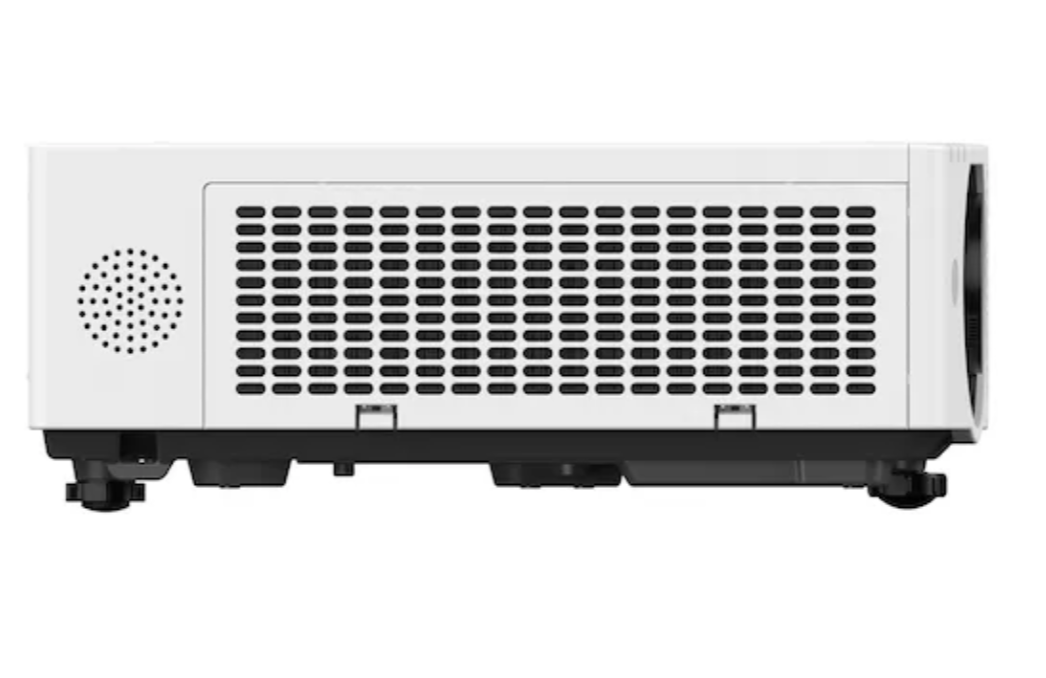
Panasonic PT-VMZ62EJ White LCD Laser Projector, 6,500 ANSI, WUXGA Beamer
Panasonic PT-VMZ62EJ White LCD Laser Projector, 6,500 ANSI, WUXGA Beamer
Couldn't load pickup availability
SKU:PT-VMZ62EJ
Delivery time 1 - 3 days *1
Question about the product
Question about the product
LCD Projectors
PT-VMZ62
The world’s smallest and lightest 6,000 lm projector1 enhances communication in brightly lit spaces
| Clear Projection Tailored to Your Space |
| Stress-free Installation Flexibility |
| Efficient and Eco-Conscious Design |
Small Size, Big Impact. Compact Brilliance Unleashed.
Introducing the VMZ82 Series: the world’s smallest and lightest projector in its class1, with up to 8,000 lm2 for crisp, vibrant visuals—even in well-lit rooms. These intuitive LCD projectors blend seamlessly into any layout, minimizing distractions and simplifying installation with exclusive features. With a sleek cabinet crafted from recycled plastic and efficient, low-maintenance operation, the VMZ82 Series invigorates communication quality in offices, classrooms, and beyond.
1 Among projectors of 8,000 lm or more (PT-VMZ82), 7,300 lm or more (PT-VMZ72), and 6,500 lm or more (PT-VMZ62) as of March 2025, according to Panasonic’s research.
2 Measured when [PICTURE MODE] is set to [DYNAMIC] and [LIGHT POWER] to [NORMAL]. Measurement, measuring conditions, and notation method are compliant with ISO/IEC 21118: 2020 international standards. Value is the average of all products upon shipment.
Clear Projection Tailored to Your Space

Up to 8,000 lm for Stunning Images Under Light
The VMZ82 Series’ high-efficiency optical engine delivered up to 8,000 lm1 of brightness for clear, sharp, and vibrant images—even in well-lit rooms. Enhance viewer comfort and communication quality in meetings and classes without dimming the lights or drawing the blinds.
1 PT-VMZ82 only. Measured when [PICTURE MODE] is set to [DYNAMIC] and [LIGHT POWER] to [NORMAL]. Measurement, measuring conditions, and notation method are compliant with ISO/IEC 21118: 2020 international standards. Value is the average of all products upon shipment.
High 5,000,000:1 Dynamic Contrast
Input signals are analyzed frame-by-frame to regulate light output for the best contrast performance in every scene. As well as faithfully reproducing images with dark and bright areas, Dynamic Contrast also achieves greater energy-efficiency than other technologies and can be adjusted to content or room lighting. The projector’s high 5,000,000:11 contrast ratio offers better definition in shadows with deeper blacks, brighter whites, and more natural skin-tones for a better sense of depth and definition.
1 Full On/Full Off, when [PICTURE MODE] is set to [DYNAMIC] and [DYNAMIC CONTRAST] is set to [1]. Measurements, measuring conditions, and documentation methods are compliant with international standards under ISO/IEC 21118:2020. The value is the average of all products upon shipment.
Optimized Visuals for Bright Spaces
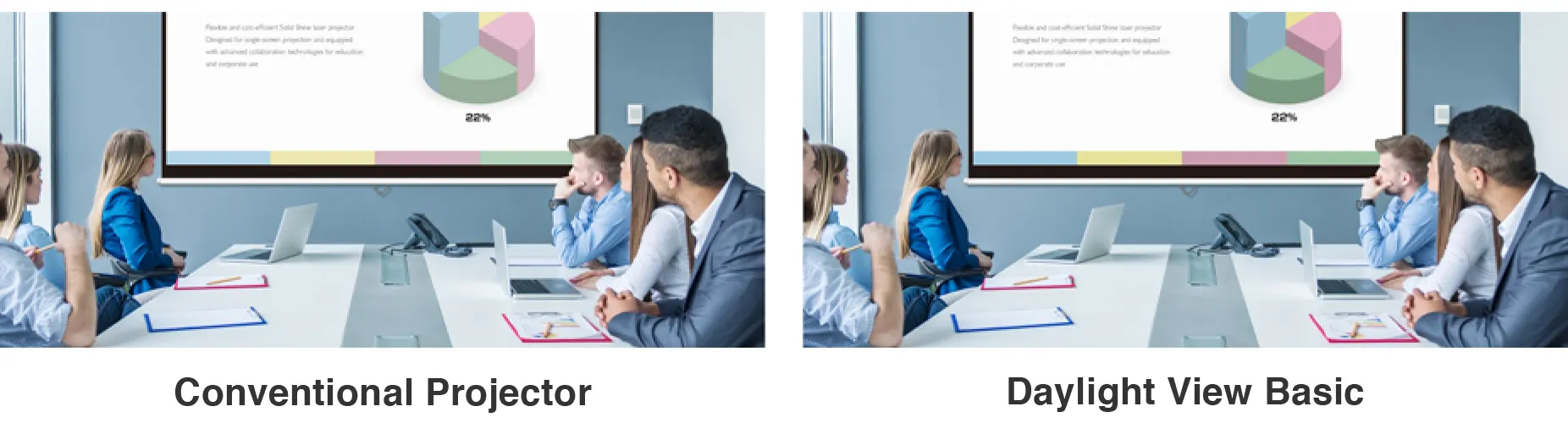
Daylight View Basic uses a sensor to measure ambient light in your room, adjusting sharpness, halftone color, contrast, and brightness to optimize image visibility regardless of room illumination. The result is a clearer, more detailed image, even in challenging conditions.

Smooth, Crisp Details at WUXGA
WUXGA (1,920 x 1,200) LCD panels enhance detail clarity for a more comfortable and insightful experience. Text edges are smooth, sharp, and easy to read, even for those seated furthest from the screen.
Vivid Green Mode for Lifelike Sports Simulations
The VMZ82 Series introduces a new Vivid Green Mode, which enhances greens for brighter, more natural images—ideal for golf and other sports simulations. By adjusting signal gain and optimizing color balance, this mode delivers deeper greens and brighter mid-tones for a more vivid and engaging viewing experience.

Supports Widescreen Video Content
Display widescreen content, such as 21:9 videoconferencing layouts, in their native aspect-ratio. Remote participants’ faces can be aligned at eye-level with in-room participants, improving communication and engagement during meetings or classes.
Note: Resolution may decrease when projecting widescreen content in native aspect-ratio.
Quiet Operation for Hybrid Classrooms and Meetings
The projector’s heat-resistant light-source reduces operating noise, enhancing clarity of conversations during in-person or remote classes and meetings. In Quiet 2 Mode, operating noise is just 25 dB1—about as quiet as the sound of rustling leaves.
1 For the PT-VMZ62. For other models’ noise levels, please refer to product specifications.

Stylish Design Blends Into Your Room
Available in black or white, VMZ82 Series projectors feature a compact form that blends unobtrusively into any setting. Whether installed in an office, classroom, or museum, the projector minimizes distractions and keeps the focus on your presentation.
Stress-free Installation Flexibility
Streamlined Installation with 1.6x Zoom and Lens-Shift
Maximize your image real estate in rooms of any shape or size. The VMZ82 Series can project a 100-inch image from 2.35 m (7.71 ft), delivering bright, vibrant visuals onto surfaces up to 300 inches. Its 1.6x optical zoom (projection ratio: 1.09 to 1.77:1) offers mounting flexibility, making it easy to bypass ceiling obstructions or adjust the image to the projection surface using an existing mount. Combined with lens-shift (V: +44%, H: ±20%), it supports off-axis and high-mount positions while maintaining precise image geometry.

Digital Zoom Extender and Digital Image Shift
Digital Zoom Extender increases the projector’s throw-distance beyond the optical zoom-range, allowing you to reuse your existing ceiling mount or install the projector further from the screen, saving on construction work. Digital Image Shift, meanwhile, allows the image to move by up to 10% in any direction when it comes to off-axis or high-ceiling installations.
Note: Resolution decreases when Digital Zoom Extender and Digital Image Shift are used. When Digital Zoom Extender is used, image reduction rate can be set to as low as 80 %. When set below 100 %, image position can be shifted vertically or horizontally with Digital Image Shift. Some image-correction functions are unavailable when using this function, and the range of corner adjustment is limited. It may not be possible to use the same projector bracket in all situations.

Quickly Find Projection Angle with the Angle Monitor
Aligning the projection angle to the screen can be challenging, often requiring two people. The VMZ82 Series features a built-in gyrosensor that detects changes in the projector’s tilt and roll angles, which are graphically displayed in the OSD menu. Installers can adjust the projection angle without assistance.
Note: The values shown are based on angle sensor detection results and may differ from the actual projection angle. They are for reference only, and accuracy is not guaranteed.
Improved Image Adjustment with New GUI
The VMZ82 Series introduces an updated image adjustment suite with an intuitive new Graphical User Interface (GUI). Designed to simplify setup in diverse spaces—including projection onto curved surfaces—the GUI optimises settings via remote control without needing a connected PC, making installation faster, easier, and more flexible than ever before.
Precise Line Adjustment via Grid Function
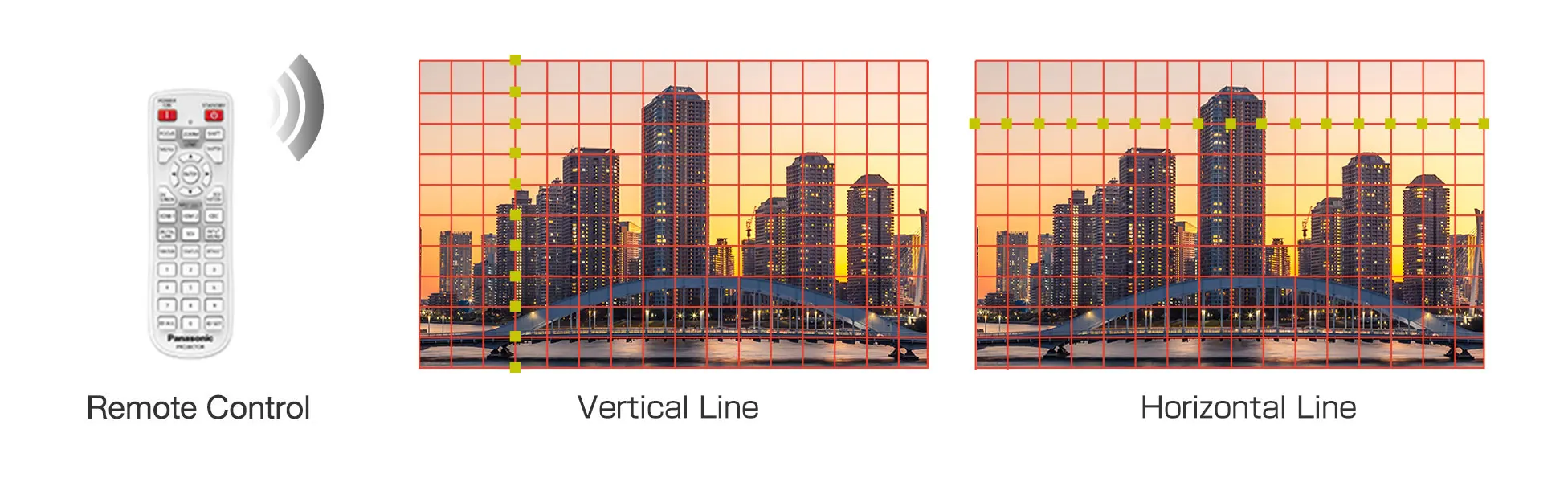
The grid function enables minor distortion correction by adjusting horizontal or vertical lines on a fixed 11 x 17 grid. Correction is easily done via remote control.
Note: The remote control shown is for illustrative purposes only.

Enhanced Curved Screen Correction
Curve Correction can now adjust each side of the image independently—unlike previous models where opposing sides moved in tandem. This added flexibility supports more accurate correction on curved surfaces, ideal for sports simulators, museum exhibits, and corporate displays.
6-Point Screen Adjustment System for Corner Projection
For corner or column projection, the 6-Point Screen Adjustment System enables fine-tuned adjustment of image geometry. It’s ideal for maximizing screen-area usage in compact meeting rooms or creating impactful visual installations in galleries and exhibition spaces.
Independent 4-Corner Adjustment
Correct trapezoidal distortion from off-center or angled projector positions. 4-Corner Adjustment enables users to control each image corner independently via remote control. Settings can be saved and reapplied to streamline setup across multiple rooms or sessions.
Maintain Aspect Ratio for Natural Scaling
"Maintain Aspect Ratio" keeps the image’s proportions during adjustment, preventing distortion or stretching. It ensures content looks natural while enabling edge-to-edge alignment, providing a clean, professional finish in any space.

Single Cable 4K DIGITAL LINK Solution
4K DIGITAL LINK is an HDBaseT™-based connection that supports long-distance transmission of video, audio, and
control signals over a single CAT 5e LAN cable, reducing installation complexity in schools, offices, and entertainment spaces.
Note: 4K input signals are converted to the projector’s resolution (1,920 x 1,200 pixels) when projected. YPBPR 4:2:0 format only for 4K/30p input via DIGITAL LINK.
Accepts 4K Signals via HDMI™ and DIGITAL LINK
The VMZ82 Series accepts 4K 1 video signals via DIGITAL LINK and HDMI™ terminals, simplifying projector integration into your existing infrastructure. This feature enables 4K1 signals to be transmitted to displays with varying screen resolutions, eliminating the need for external converters or content recoding.
1 4K input signals are converted to the projector’s resolution (1,920 x 1,200 pixels) when projected. YPBPR 4:2:0 format only for 4K/30p signals input via DIGITAL LINK.
Supports Next-Generation Control Protocols
Dedicated LAN and DIGITAL LINK interfaces support the latest protocols, including IPv6, Art-Net DMX, PJLink™ (Class 2), Crestron Connected® V2, Crestron® XiO Cloud, and Extron XTP®. The projector also features an emulation function to ensure compatibility with legacy management software.
Note: The optional AJ-WM50-type Wireless Module does not support IPv6.
Data Cloning Function via LAN or USB Memory
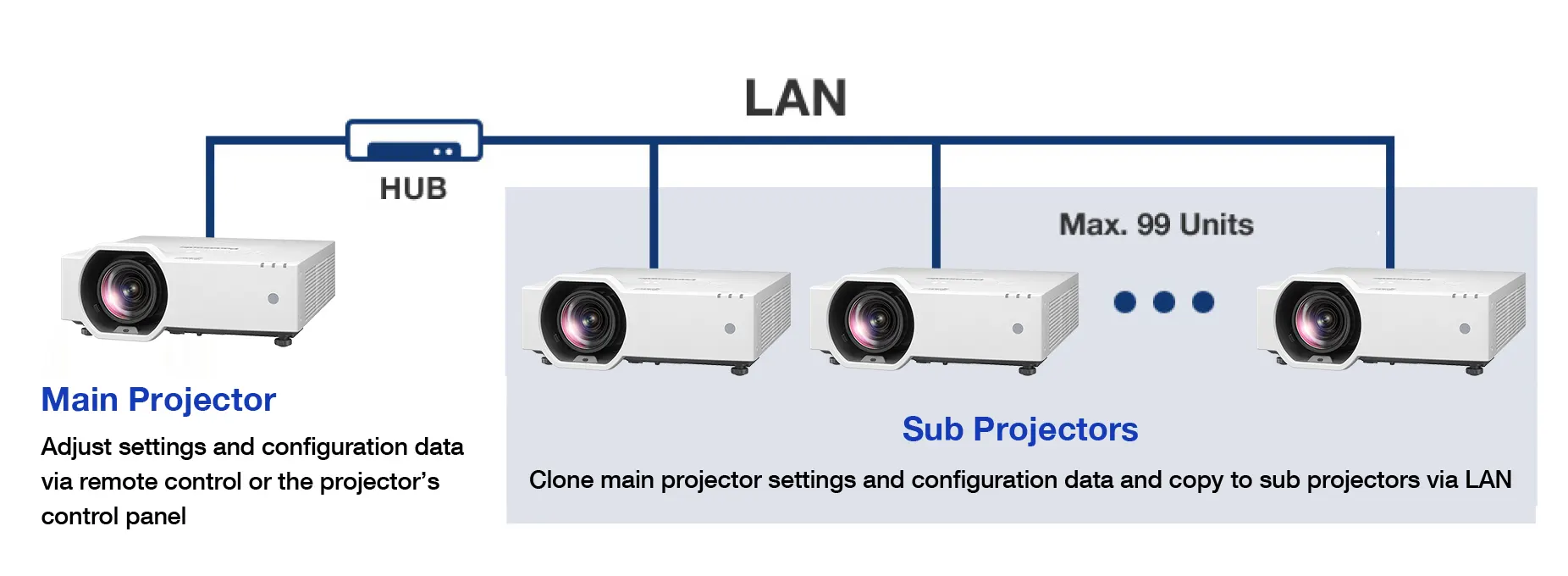
Applying the same settings to every projector in your fleet can be time-consuming. To speed up this task, the VMZ82 Series features a Data Cloning Function that allows main projector settings—including saved adjustment data—to be copied to sub-projectors via LAN or USB device.
Note: Supported only for identical models. Excludes passwords, projector name/ID, time, date, time zone, and network settings. Data can be copied to a maximum of 99 sub-projectors via LAN.

CEC-Command Compatible HDMI™ Makes Life Easy
Both the projector’s HDMI™ inputs are CEC-Command1 compatible, reducing the number of remote controls needed. The projector automatically switches on, plays content, and switches off when it detects these commands from a compatible source device.
12 Depending on the connected, command-compatible CEC device, link control may not operate as expected.
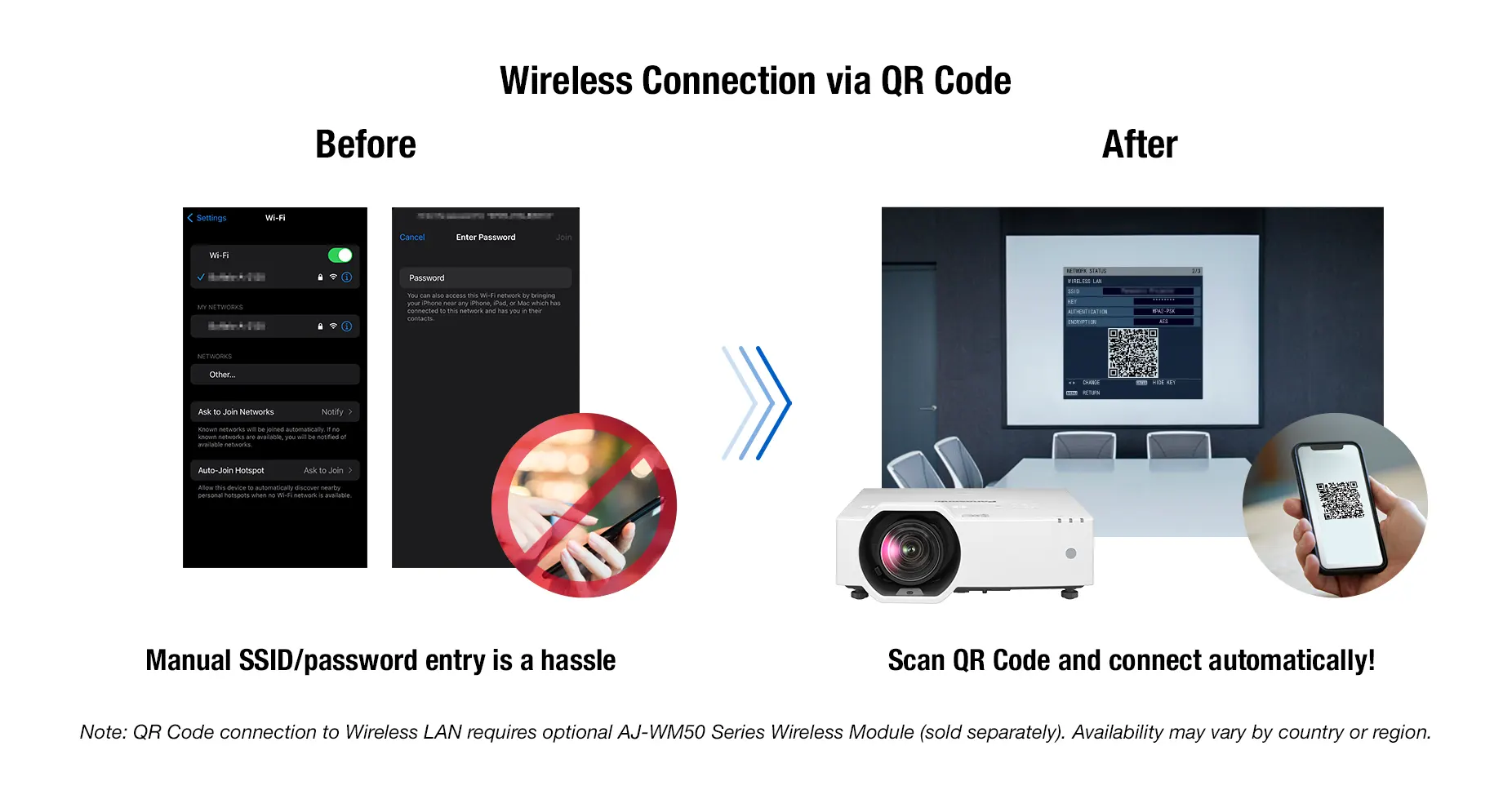
Wirelessly Project from Your Smartphone or Laptop
Share content wirelessly1 from your laptop or smartphone. Simply scan the QR Code displayed on the on-screen menu with your smartphone’s camera, and your device automatically connects to the projector via Wi-Fi without SSID or password input required. Use the free Panasonic Wireless Apps2 to cast your media to the big screen.
1 Requires optional Wireless Module AJ-WM50 Series (sold separately). Product availability may vary by country or region.
2 Free software is available for Windows® PC here:. Wireless Projector App is available from the App Store or Google Play Store. Please check device compatibility before installation.

Share Seamlessly with PressIT
Wirelessly share your device’s screen and switch presenters at the touch of a button. PressIT, Panasonic’s optional wireless presentation system, supports on-demand screen-sharing. PressIT consists of transmitters that connect to your devices1, and a receiver that connects to the projector. For a clean install, power is supplied by the projector’s DC 5 V/2 A USB terminal. Learn more about PressIT here, or visit our Wireless Solutions webpage.
Note: PressIT Wireless Presentation System is sold separately. Availability may vary by country or region.
1 Video output device’s USB Type-C terminal requires support for DisplayPort™ ALT Mode (video output function) and Power Delivery function (5 V/0.9 A). PressIT app (free on App Store or Google Play Store) is required when using Android™ or iOS/iPadOS devices. For more details, please refer to the operating instructions.
Efficient and Eco-Conscious Design

Our Most Efficient Portable Projector
The PT-VMZ82 Series is 27%1 more energy-efficient than the current VMZ71 Series, producing an impressive 21.2 lumens of light per watt of power consumed in NORMAL Mode. Enjoy significant energy savings and reduce the carbon footprint of each unit in your fleet.
1 PT-VMZ72 (21.2 lm/W) compared to PT-VMZ71 (16.7 lm/W) in [NORMAL] Mode, according to Panasonic survey.
2 Measured when [PICTURE MODE] is set to [DYNAMIC] and [LIGHT POWER] is set to [NORMAL]. Measurement, measuring conditions, and notation method all comply with ISO/IEC 21118: 2020 international standards. Value is the average of all products upon shipment.

Features Eco-Friendly Recycled Materials
The VMZ82 Series has been developed with sustainability in mind. The plastic used in the main projector body is comprised of approximately 59%1 recycled resin to reduce reliance on virgin plastics. Recyclable cardboard insulation replaces foam in the shipping carton, and unnecessary packaging has been eliminated to save waste. These efforts support eco-conscious manufacturing and help your company reduce its footprint throughout the projector’s entire lifecycle.
1 Based on total weight of plastic parts in main projector unit. Excludes projection lens, PCBs, labels, cables, connectors, electronic components, optical components, ESD components, EMI components adhesives, and coatings.

No Light-Source Maintenance for 20,000 Hours
The VMZ82 Series offers more than just consistent, long-lasting image quality. The laser light-source operates for about 20,000 hours1 maintenance-free, outperforming lamp projectors that require multiple lamp changes over the same period. This lowers running costs and eliminates mercury-lamp disposal.
1 At this time, light output will have decreased to approximately 50 % of its original level ([PICTURE MODE]: [DYNAMIC], [DYNAMIC CONTRAST] set to [2], temperature
30 °C [86 °F], elevation 700 m [2,297 ft] with 0.15 mg/m3 of particulate matter). Estimated time until light output declines to 50 % varies depending on environment.
Filter cleaning cycle: 20,000 hours (under dust conditions of 0.08 mg/m3), 10,000 hours (under dust conditions of 0.15 mg/m3). Filter cleaning cycle varies depending on environment.

Long-Life ECO Filter Reduces Downtime
ECO Filter includes a micro-cut filter that collects minute dust particles with electrostatic effect. With the dust-resistant projector cabinet design, ECO Filter enables low-maintenance and long-term use with less downtime. Filter replacement is recommended after approximately 20,000 hours1 when used in typical commercial environments. If it becomes necessary to maintain the filter sooner, it can be washed and reused2 to reduce cost and waste.
1 Filter cleaning cycle: 20,000 hours (under dust conditions of 0.08 mg/m3), 10,000 hours (under dust conditions of 0.15 mg/m3).
2 Filter can be washed and reused up to two times. When washing the filter with water, please follow the procedures listed in the operating instructions.

Auto Power On: Save Power, Optimize Operation
The VMZ82 Series includes an Auto Power On function, which automatically turns the projector on from standby and commences projection when an input signal is detected. This allows presenters to turn the projector off between sessions without worrying about delays, streamlining daily operation and reducing unnecessary power consumption.
Note: Settings cannot be made if [STANDBY MODE] is set to [ECO] or if [IN STANDBY MODE] in the [AUDIO SETTINGS] menu is set to [ON]. Auto Power On is supported when input signal is transmitted via HDMI™ or COMPUTER IN terminals.
Image Detection: Smart Power-Saving
A new Image Detection function helps reduce power consumption during inactivity. If no change in the projected image is detected for a preset amount of time, the projector can automatically dim light output by 50% or switch the light source off. The timer is adjustable, and brightness seamlessly returns when activity1 resumes, avoiding wasted energy without interrupting the experience.
1 If the projector enters standby while in Image Detection Power Save Mode, resume time may vary depending on standby settings and input source.
Note: Settings cannot be made if [DYNAMIC CONTRAST] is set to anything other than [OFF], [ECO MANAGEMENT] → [AUTO POWER SAVE] is set to [OFF], [ECO MANAGEMENT] → [LIGHT POWER] is set to anything other than [NORMAL], a [TEST PATTERN] is being displayed, or no signal is present. Image Detection function is supported when input signal is transmitted via HDMI™ or COMPUTER IN terminals.
Get to Work Faster with Quick On
The VMZ82 Series features a Quick Start-up Mode. When enabled, the projector will display your content at full brightness in about one second1 when started from standby—no lamp-based projector warm-up delay. This allows you to quickly resume presentations and minimize distractions. What’s more, you can power down the projector using the room’s main switch, or by unplugging the AC cord, with Direct Power Off2—no cool-down time needed.
1 When [ECO MANAGEMENT] > [QUICK STARTUP] is set to [ON]. [QUICK STARTUP] is not available after the [AVAILABLE PERIOD] setting has expired. When [QUICK STARTUP] is set to [ON], the projector continues to warm up, increasing power consumption. When [QUICK STARTUP] is set to [ON], the standby period during which the [QUICK STARTUP] function is valid is added as projector operating time. [QUICK STARTUP] cannot be set when [STANDBY MODE] is set to [ECO]. Time depends on interfaces, signals, and other conditions.
2 settings made just before disconnecting the power supply may not be retained at the next startup.
Effortless Automation with Integrated Scheduling
The VMZ82 Series introduces a new scheduling function, accessible via the OSD settings menu. You can program the projector to perform automated actions at specific times throughout the week, including powering on and off, shutter activation, and input selection. This feature streamlines operations, reduces manual labor, and optimizes resource management.
Works with Multi Monitoring & Control Software
The VMZ82 Series is compatible with Multi Monitoring & Control Software, enabling management of up to 2,048 display devices from a remote PC over a LAN. The software facilitates status monitoring, device control, playlist provisioning, playback scheduling, and visualization of system components. For more information, please visit our Software Information Page.
Other Features
- Shutter function and Auto Image Rotation function
- Remote control audio feedback for projector power on/off
- Security slot and customizable startup logo
- USB terminal for DC 5 V/2 A power supply, data transfer, firmware updates, and optional wireless module
- Lens block detection reduces light output if lens is covered to prevent damage
- Compatible with Multiple PJ Firmware Batch Update Tool
- Presentation support system
- Multi-screen projection support system
- Brightness and color control for multiple units
- DICOM simulation mode
- ECO Management System
Specifications Table
| Projector type | LCD projectors |
|---|---|
| Display method | Transparent LCD panel (x 3, R/G/B) |
| Display Device -> Panel size | 16.3 mm (0.64 inch) (16:10 aspect ratio) |
| Display Device -> Number of pixels | 2,304,000 (1920 x 1200) pixels x 3 |
| Light source | Laser diodes |
| Light output *1 | VMZ82 : 8,000 lm*2VMZ72 : 7,300 lm*2VMZ62 : 6,500 lm*2 |
| Light output (ANSI) | VMZ82 : 8,000 lm (ANSI)*3VMZ72 : 7,300 lm (ANSI)*3VMZ62 : 6,500 lm (ANSI)*3 |
| Time until light output declines to 50 % -> NORMAL *3 | 20,000 hours [NORMAL] |
Specifications
Specifications
Detailed information
Detailed information
Features
Features
Warranty conditions
Warranty conditions
Delivery and payment conditions
Delivery and payment conditions
Battery information
Battery information
Manufacturer
Manufacturer
Operating instructions
Operating instructions